Note
Go to the end to download the full example code.
TOF listmode OSEM with projection data
This example demonstrates the use of the listmode OSEM algorithm to minimize the negative Poisson log-likelihood function.
subject to
using the listmode linear forward model
and data stored in listmode format (event by event).
Tip
parallelproj is python array API compatible meaning it supports different
array backends (e.g. numpy, cupy, torch, …) and devices (CPU or GPU).
Choose your preferred array API xp and device dev below.

32 from __future__ import annotations
33 from parallelproj import Array
34
35 import array_api_compat.numpy as xp
36
37 # import array_api_compat.cupy as xp
38 # import array_api_compat.torch as xp
39
40 import parallelproj
41 from array_api_compat import to_device, size
42 import array_api_compat.numpy as np
43 import matplotlib.pyplot as plt
44 import matplotlib.animation as animation
45 from copy import copy
46
47 # choose a device (CPU or CUDA GPU)
48 if "numpy" in xp.__name__:
49     # using numpy, device must be cpu
50     dev = "cpu"
51 elif "cupy" in xp.__name__:
52     # using cupy, only cuda devices are possible
53     dev = xp.cuda.Device(0)
54 elif "torch" in xp.__name__:
55     # using torch valid choices are 'cpu' or 'cuda'
56     if parallelproj.cuda_present:
57         dev = "cuda"
58     else:
59         dev = "cpu"
Simulation of PET data in sinogram space
In this example, we use simulated listmode data for which we first need to setup a sinogram forward model to create a noise-free and noisy emission sinogram that can be converted to listmode data.
Setup of the sinogram forward model
We setup a linear forward operator \(A\) consisting of an image-based resolution model, a non-TOF PET projector and an attenuation model
 78 num_rings = 5
 79 scanner = parallelproj.RegularPolygonPETScannerGeometry(
 80     xp,
 81     dev,
 82     radius=65.0,
 83     num_sides=12,
 84     num_lor_endpoints_per_side=15,
 85     lor_spacing=2.3,
 86     ring_positions=xp.linspace(-10, 10, num_rings),
 87     symmetry_axis=2,
 88 )
 89
 90 # setup the LOR descriptor that defines the sinogram
 91
 92 img_shape = (40, 40, 8)
 93 voxel_size = (2.0, 2.0, 2.0)
 94
 95 lor_desc = parallelproj.RegularPolygonPETLORDescriptor(
 96     scanner,
 97     radial_trim=10,
 98     max_ring_difference=2,
 99     sinogram_order=parallelproj.SinogramSpatialAxisOrder.RVP,
100 )
101
102 proj = parallelproj.RegularPolygonPETProjector(
103     lor_desc, img_shape=img_shape, voxel_size=voxel_size
104 )
105
106 # setup a simple test image containing a few "hot rods"
107 x_true = xp.ones(proj.in_shape, device=dev, dtype=xp.float32)
108 c0 = proj.in_shape[0] // 2
109 c1 = proj.in_shape[1] // 2
110 x_true[(c0 - 2) : (c0 + 2), (c1 - 2) : (c1 + 2), :] = 5.0
111 x_true[4, c1, 2:] = 5.0
112 x_true[c0, 4, :-2] = 5.0
113
114 x_true[:2, :, :] = 0
115 x_true[-2:, :, :] = 0
116 x_true[:, :2, :] = 0
117 x_true[:, -2:, :] = 0
Attenuation image and sinogram setup
124 # setup an attenuation image
125 x_att = 0.01 * xp.astype(x_true > 0, xp.float32)
126 # calculate the attenuation sinogram
127 att_sino = xp.exp(-proj(x_att))
Complete sinogram PET forward model setup
We combine an image-based resolution model, a non-TOF or TOF PET projector and an attenuation model into a single linear operator.
137 # enable TOF - comment if you want to run non-TOF
138 proj.tof_parameters = parallelproj.TOFParameters(
139     num_tofbins=13, tofbin_width=12.0, sigma_tof=12.0
140 )
141
142 # setup the attenuation multiplication operator which is different
143 # for TOF and non-TOF since the attenuation sinogram is always non-TOF
144 if proj.tof:
145     att_op = parallelproj.TOFNonTOFElementwiseMultiplicationOperator(
146         proj.out_shape, att_sino
147     )
148 else:
149     att_op = parallelproj.ElementwiseMultiplicationOperator(att_sino)
150
151 res_model = parallelproj.GaussianFilterOperator(
152     proj.in_shape, sigma=4.5 / (2.35 * proj.voxel_size)
153 )
154
155 # compose all 3 operators into a single linear operator
156 pet_lin_op = parallelproj.CompositeLinearOperator((att_op, proj, res_model))
Simulation of sinogram projection data
We setup an arbitrary ground truth \(x_{true}\) and simulate noise-free and noisy data \(y\) by adding Poisson noise.
165 # simulated noise-free data
166 noise_free_data = pet_lin_op(x_true)
167
168 # generate a contant contamination sinogram
169 contamination = xp.full(
170     noise_free_data.shape,
171     0.5 * float(xp.mean(noise_free_data)),
172     device=dev,
173     dtype=xp.float32,
174 )
175
176 noise_free_data += contamination
177
178 # add Poisson noise
179 np.random.seed(1)
180 y = xp.asarray(
181     np.random.poisson(parallelproj.to_numpy_array(noise_free_data)),
182     device=dev,
183     dtype=xp.int16,
184 )
Conversion of the emission sinogram to listmode
Using RegularPolygonPETProjector.convert_sinogram_to_listmode() we can convert an
integer non-TOF or TOF sinogram to an event list for listmode processing.
Note: The create event list is sorted and should be shuffled running LM-MLEM.
195 event_start_coords, event_end_coords, event_tofbins = proj.convert_sinogram_to_listmode(
196     y
197 )
Setup of the LM subset projectors and LM subset forward models
203 num_subsets = 10
204 subset_slices = [slice(i, None, num_subsets) for i in range(num_subsets)]
205
206 lm_pet_subset_linop_seq = []
207
208 for i, sl in enumerate(subset_slices):
209     subset_lm_proj = parallelproj.ListmodePETProjector(
210         event_start_coords[sl, :],
211         event_end_coords[sl, :],
212         proj.in_shape,
213         proj.voxel_size,
214         proj.img_origin,
215     )
216
217     # recalculate the attenuation factor for all LM events
218     # this needs to be a non-TOF projection
219     subset_att_list = xp.exp(-subset_lm_proj(x_att))
220
221     # enable TOF in the LM projector
222     subset_lm_proj.tof_parameters = proj.tof_parameters
223     if proj.tof:
224         # we need to make a copy of the 1D subset event_tofbins array
225         # stupid way of doing this, but torch asarray copy doesn't seem to work
226         subset_lm_proj.event_tofbins = 1 * event_tofbins[sl]
227         subset_lm_proj.tof = proj.tof
228
229     subset_lm_att_op = parallelproj.ElementwiseMultiplicationOperator(subset_att_list)
230
231     lm_pet_subset_linop_seq.append(
232         parallelproj.CompositeLinearOperator(
233             (subset_lm_att_op, subset_lm_proj, res_model)
234         )
235     )
236
237 lm_pet_subset_linop_seq = parallelproj.LinearOperatorSequence(lm_pet_subset_linop_seq)
238
239 # create the contamination list
240 contamination_list = xp.full(
241     event_start_coords.shape[0],
242     float(xp.reshape(contamination, (size(contamination),))[0]),
243     device=dev,
244     dtype=xp.float32,
245 )
LM OSEM reconstruction
The EM update that can be used in LM-OSEM is given by
to calculate the minimizer of \(f(x)\) iteratively.
260 def lm_em_update(
261     x_cur: Array,
262     op: parallelproj.LinearOperator,
263     s: Array,
264     adjoint_ones: Array,
265 ) -> Array:
266     """LM EM update
267
268     Parameters
269     ----------
270     x_cur : Array
271         current solution
272     op : parallelproj.LinearOperator
273         subset listmode linear forward operator
274     s : Array
275         subset contamination list
276     adjoint_ones : Array
277         adjoint of ones of the non-LM (the complete) operator
278         divided by the number of subsets
279
280     Returns
281     -------
282     Array
283         _description_
284     """
285     ybar = op(x_cur) + s
286     return x_cur * op.adjoint(1 / ybar) / adjoint_ones
Run LM OSEM iterations
293 # number of MLEM iterations
294 num_iter = 50 // num_subsets
295
296 # initialize x
297 x = xp.ones(pet_lin_op.in_shape, dtype=xp.float32, device=dev)
298 # calculate A^H 1
299 adjoint_ones = pet_lin_op.adjoint(
300     xp.ones(pet_lin_op.out_shape, dtype=xp.float32, device=dev)
301 )
302
303 for i in range(num_iter):
304     for k, sl in enumerate(subset_slices):
305         print(f"OSEM iteration {(k+1):03} / {(i + 1):03} / {num_iter:03}", end="\r")
306         x = lm_em_update(
307             x,
308             lm_pet_subset_linop_seq[k],
309             contamination_list[sl],
310             adjoint_ones / num_subsets,
311         )
Calculate the negative Poisson log-likelihood function of the reconstruction
317 # calculate the negative Poisson log-likelihood function of the reconstruction
318 exp = pet_lin_op(x) + contamination
319 # calculate the relative cost and distance to the optimal point
320 cost = float(xp.sum(exp - xp.astype(y, xp.float32) * xp.log(exp)))
321 print(
322     f"\nLM-OSEM cost {cost:.6E} after {num_iter:03} iterations with {num_subsets} subsets"
323 )
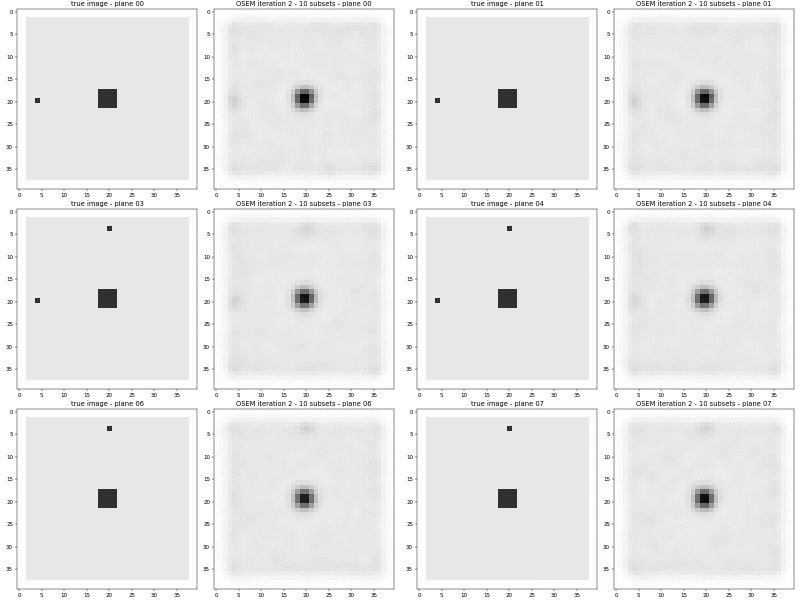
Visualize the results
331 def _update_img(i):
332     img0.set_data(x_true_np[:, :, i])
333     img1.set_data(x_np[:, :, i])
334     ax[0].set_title(f"true image - plane {i:02}")
335     ax[1].set_title(
336         f"LM OSEM iteration {num_iter} - {num_subsets} subsets - plane {i:02}"
337     )
338     return (img0, img1)
339
340
341 x_true_np = parallelproj.to_numpy_array(x_true)
342 x_np = parallelproj.to_numpy_array(x)
343
344 fig, ax = plt.subplots(1, 2, figsize=(10, 5))
345 vmax = x_np.max()
346 img0 = ax[0].imshow(x_true_np[:, :, 0], cmap="Greys", vmin=0, vmax=vmax)
347 img1 = ax[1].imshow(x_np[:, :, 0], cmap="Greys", vmin=0, vmax=vmax)
348 ax[0].set_title(f"true image - plane {0:02}")
349 ax[1].set_title(f"LM OSEM iteration {num_iter} - {num_subsets} subsets - plane {0:02}")
350 fig.tight_layout()
351 ani = animation.FuncAnimation(fig, _update_img, x_np.shape[2], interval=200, blit=False)
352 fig.show()
Related examples