Note
Go to the end to download the full example code.
Modularized (block) PET scanner geometry
In this example, we show how to setup a generic PET scanner consisting of multiple block modules where each block module consists of a regular grid of LOR endpoints. We also show how to define a LOR descriptor for this geometry using a description of which block pairs are in coincidence.
import parallelproj.pet_scanners
import parallelproj.pet_lors
import matplotlib.pyplot as plt
import math
from parallelproj._examples_utils import suggest_array_backend_and_device

# To use a specific backend and/or device, replace the None arguments, e.g.:
#   xp, dev = suggest_array_backend_and_device(backend="numpy", dev="cpu") or by setting xp and dev manually
xp, dev = suggest_array_backend_and_device(None, None)
Using array API: array_api_compat.torch, device: cpu
input parameters
# grid shape of LOR endpoints forming a block module
block_shape = (3, 2, 2)
# spacing between LOR endpoints in a block module
block_spacing = (1.5, 1.2, 1.7)
# radius of the scanner
scanner_radius = 10
Setup of a modularized PET scanner geometry
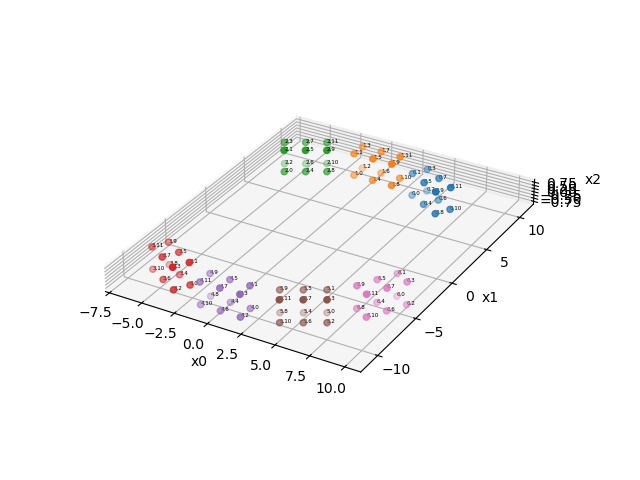
We define 7 block modules arranged in a circle with a radius of 10. The arangement follows a regular polygon with 12 sides, leaving some of the sides empty. Note that all block modules must be identical, but can be anywhere in space. The location of a block module can be changed using an affine transformation matrix.
mods = []

delta_phi = 2 * xp.pi / 12

# setup an affine transformation matrix to translate the block modules from the
# center to the radius of the scanner
aff_mat_trans = xp.eye(4, device=dev)
aff_mat_trans[1, -1] = scanner_radius

for phi in [
    -delta_phi,
    0,
    delta_phi,
    5 * delta_phi,
    6 * delta_phi,
    7 * delta_phi,
    8 * delta_phi,
]:
    # setup an affine transformation matrix to rotate the block modules around the center
    # (of the "2" axis)
    aff_mat_rot = xp.asarray(
        [
            [math.cos(phi), -math.sin(phi), 0, 0],
            [math.sin(phi), math.cos(phi), 0, 0],
            [0, 0, 1, 0],
            [0, 0, 0, 1],
        ],
        device=dev,
    )
    mods.append(
        parallelproj.pet_scanners.BlockPETScannerModule(
            xp,
            dev,
            block_shape,
            block_spacing,
            affine_transformation_matrix=(aff_mat_rot @ aff_mat_trans),
        )
    )

# create the scanner geometry from a list of identical block modules at
# different locations in space
scanner = parallelproj.pet_scanners.ModularizedPETScannerGeometry(mods)
Show the scanner geometry consisting of 7 block modules
fig = plt.figure(tight_layout=True)
ax = fig.add_subplot(111, projection="3d")
ax.view_init(elev=-30, azim=160, roll=180, vertical_axis="y")
scanner.show_lor_endpoints(ax, annotation_fontsize=4, show_linear_index=False)
fig.show()
Setup of a LOR descriptor consisting of block pairs
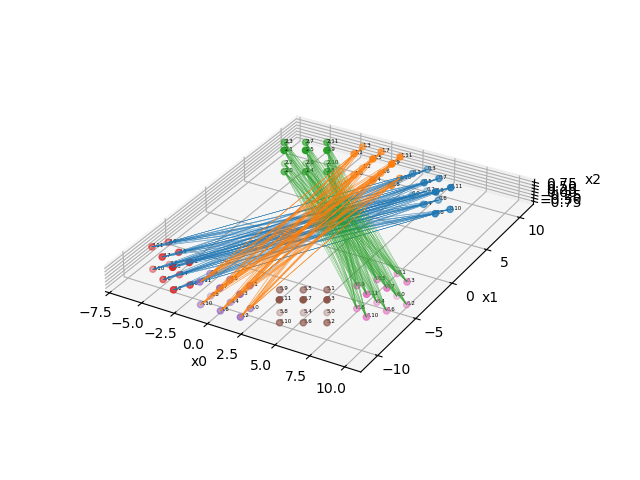
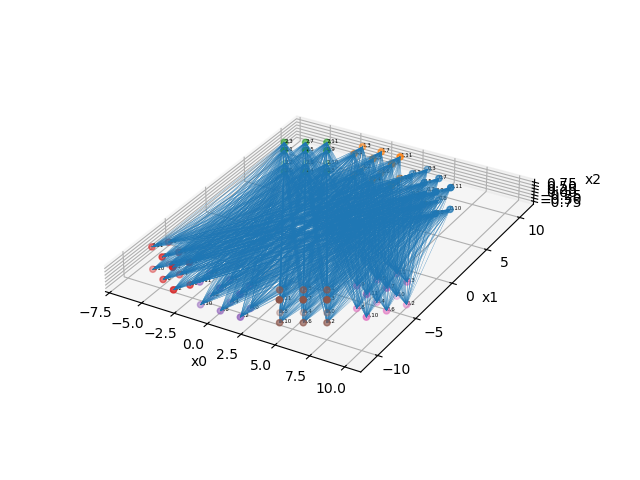
Once the geometry of the LOR endpoints is defined, we can define the LORs by specifying which block pairs are in coincidence and for “valid” LORs. To do this, we have manually define a list containing pairs of block numbers. Here, we define 12 block pairs. Note that more pairs would be possible.
lor_desc = parallelproj.pet_lors.EqualBlockPETLORDescriptor(
    scanner,
    xp.asarray(
        [
            [0, 3],
            [0, 4],
            [0, 5],
            [0, 6],
            [1, 3],
            [1, 4],
            [1, 5],
            [1, 6],
            [2, 3],
            [2, 4],
            [2, 5],
            [2, 6],
        ]
    ),
)
Visualize all LORs of 3 block pairs block pair 0: connecting block 0 and block 3 block pair 5: connecting block 1 and block 4 block pair 11: connecting block 2 and block 6
fig2 = plt.figure(tight_layout=True)
ax2 = fig2.add_subplot(111, projection="3d")
ax2.view_init(elev=-30, azim=160, roll=180, vertical_axis="y")
scanner.show_lor_endpoints(ax2, annotation_fontsize=4, show_linear_index=False)
lor_desc.show_block_pair_lors(
    ax2, block_pair_nums=xp.asarray([0], device=dev), color=plt.cm.tab10(0)
)
lor_desc.show_block_pair_lors(
    ax2, block_pair_nums=xp.asarray([5], device=dev), color=plt.cm.tab10(1)
)
lor_desc.show_block_pair_lors(
    ax2, block_pair_nums=xp.asarray([11], device=dev), color=plt.cm.tab10(2)
)
fig2.show()
Visualize all LORs of all defined block pairs
fig3 = plt.figure(tight_layout=True)
ax3 = fig3.add_subplot(111, projection="3d")
ax3.view_init(elev=-30, azim=160, roll=180, vertical_axis="y")
scanner.show_lor_endpoints(ax3, annotation_fontsize=4, show_linear_index=False)
lor_desc.show_block_pair_lors(ax3, block_pair_nums=None, color=plt.cm.tab10(0))
fig3.show()
We can get the start and end coordinates of LORs for a specific block pair or for all block pairs.
# get the start and end coordinates of all LORs in block pair 0 (connecting block 0 and block 3)
xstart0, xend0 = lor_desc.get_lor_coordinates(xp.asarray([0], device=dev))

# get the start and end coordinates of all LORs in block pair 4 (connecting block 1 and block 3)
xstart3, xend3 = lor_desc.get_lor_coordinates(xp.asarray([4], device=dev))

# get the start and end coordinates of all LORs of all block pairs
xstart, xend = lor_desc.get_lor_coordinates()
Total running time of the script: (0 minutes 0.766 seconds)